
Free interactive demo · about 15 min
See where AI spend is going, and what it could cost next month
Explore a pre-built dashboard of AI token usage, costs, and departmental spend, where Finance and IT can identify issues and make forecast changes before the bill arrives.
Sample data · Nothing to install · Runs in your browser
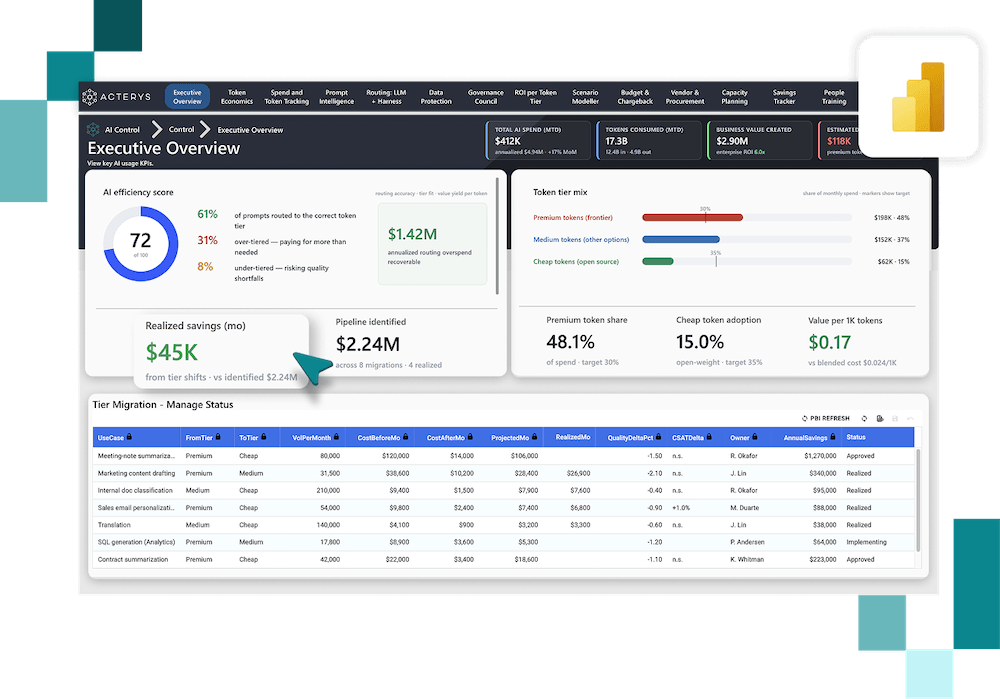
Est. overspend / month $118K
Realized savings / month $45K
Trusted by





Your AI Bill Tells You What You Spent.
It Does Not Tell You What to Do Next.
Explore the Acterys AI Spend and Token Cost Tracker, a free, pre-built interactive Power BI experience that brings AI token usage, spend, model economics, efficiency and forward-looking analysis together in one view.
Try a 30-second forecast
See how changing the mix of AI models could affect annual spend—without reducing AI usage.
$25K$1M
Annual spend after optimization
$4.37M
vs. $4.80M before
Potential annual savings
$429K
$36K per month
Illustrative estimate using sample model-tier costs and unchanged token volume. Actual savings depend on workload suitability, quality and security requirements.
What Will It Take to Get Control of Your AI Spend?
In about 15 minutes, explore a pre-built Power BI experience designed around the questions Finance and IT teams increasingly need to answer as AI usage grows.
-
Finance
Will your AI spend outpace your budget before you can respond?
Explore how changes in AI consumption could affect future costs, so you can plan ahead instead of explaining budget surprises after the fact.
-
IT / Technology
Are your teams paying premium AI prices for work that doesn’t need them?
Compare model tiers, costs and quality to identify where you could optimize spend without compromising business value.
-
Finance + IT
Who’s accountable for your AI spend as usage spreads across the business?
Explore how budgets, scenarios, ownership and approvals can help your teams plan, control and act on AI spend in Power BI.
-
Open the dashboard
Start with realistic sample data.
-
Explore and interact
Analyze AI spend and explore scenarios.
-
Take it further
See how you can apply the approach to your data with Acterys.
You enter the people, do a refresh, and within seconds the impact flows through to every report, right down to the variance report.
from plan entry to variance impact in Power BI
See What AI Spend Control Could Look Like
With the AI Spend and Token Cost Tracker you can explore the AI spend management approach with realistic sample data.
When you are ready to manage AI spend using your own data, Acterys connects to your live source system data and extends Power BI with:
- Forecasting and planning
- Scenario modeling
- Governed writeback
- Workflow and approvals
- Allocation and chargeback
- Business rules
- Governance and auditability

Take the First Step Toward Controlling Your AI Spend
Explore the free dashboard in about 15 minutes. Start with realistic sample data and see what better AI spend management could look like in Power BI.
Frequently Asked Questions
A free, interactive Power BI experience from Acterys that lets you explore AI token usage, spend drivers, model economics and AI spend management using realistic sample data.
No. The free experience lets you explore a specific AI spend management use case without implementing Acterys in your environment. Connecting live data and adding customer-specific forecasting, workflow and governed writeback requires Acterys.
The experience shows how token usage, cost, model economics and related analysis can be brought together in Power BI so you can see where spend is concentrated and what is driving changes.
The free experience uses sample data. Acterys can connect your live source systems and apply the approach to your organization's data, requirements and business processes.
Provider usage dashboards are useful for seeing what has already been consumed, but visibility alone does not tell teams what to do next. The AI Spend and Token Cost Tracker brings usage, cost, model economics, efficiency and forward-looking analysis together in Power BI. Acterys extends that approach with planning, scenario modeling, workflow and governed writeback.
AI Spend Management is one example of how Acterys extends Power BI with planning, modeling, workflow and governed writeback so teams can move from analyzing business data to actively managing business processes.
See where your AI budget is heading in 15 minutes.